We will lead you through the process of installing Captain T2 on Windows.
For macOS instructions, click hereCaptain T2 is an application that launches a web browser in "circumvention mode".
We are in no way associated with Chromium, the web browser that we use.我们将引导您完成在微软窗口系统上安装T船长第二版的过程。
有关苹果系统的操作说明,请点击这里T船长第二版会启动Chromium浏览器并赋予它绕行的功能。
开发者和所用到的Chromium浏览器没有直接的关系。我們將引導您完成在微軟視窗系統上安裝T船長第二版的過程。
有關蘋果系統的操作說明,請點擊這裡T船長第二版會啟動Chromium瀏覽器並賦予它繞行的功能。
開發者和所用到的Chromium瀏覽器沒有直接的關係。Click here to download Captain T2
Select "Keep" to keep the downloaded file if asked.
For older 32-bit Windows, click here.
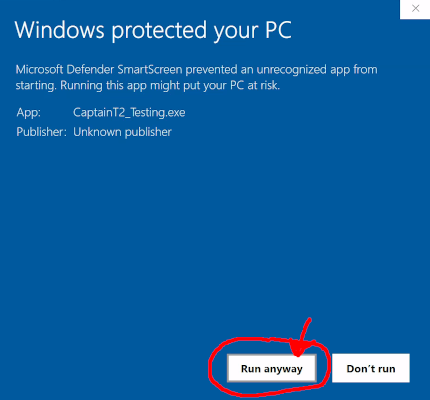
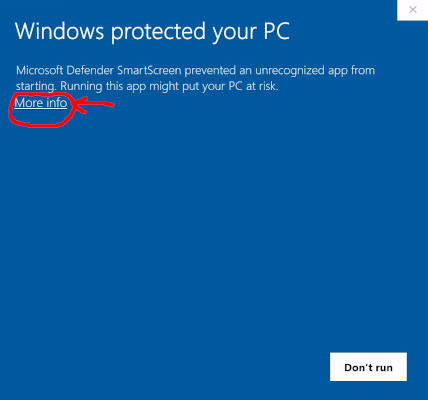
Now run the Captain T2 executable and confirm you want to run it anyway.
You will see warnings like below, which is normal, because we have
not registered ourselves as the publisher for security reasons.
下载T船长第二版
如果被问及,选择"保留"以保留下载的文件。32位旧版微软窗口系统,
请点击这里。
现在运行T船长第二版可执行文件,并确认您想运行它。
您会看到如下的警告,这是正常的,因为出于安全考虑,我们没有将自己注册为发布者。
下載T船長第二版
如果被問及,選擇"保留"以保留下載的文件。 32位舊版微軟窗口系統,
請點擊這裡。
現在運行T可船長第二版執行文件,並確認你想運行它。
您會看到如下的警告,這是正常的,因為出於安全考慮,我們沒有將自己註冊為發布者。
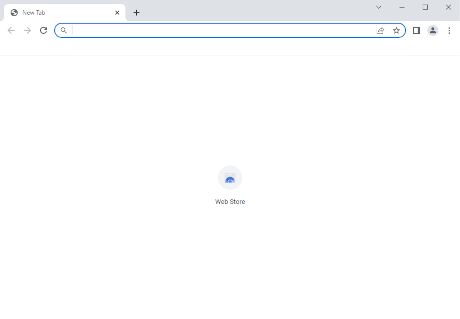
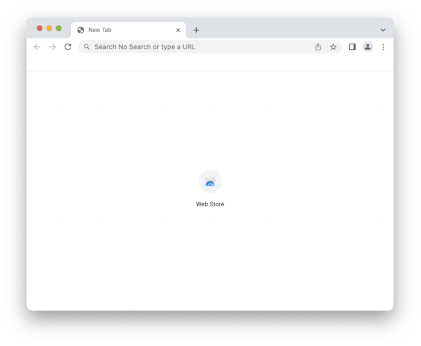
When you run Captain T2 successfully, a Chromium window should appear, which looks like this:
When Chromium is launched by Captain T2, you may use it to access the sites you need. Observers will only see that you are connected to the Captain T2 servers, not which sites you visit.
如果T船长第二版运行成功,会出现一个Chromium浏览器窗口,如下所示:
当Chromium浏览器由T船长第二版启动后,您可以用它来访问您需要访问的网站。监管只会看到您连接到T船长第二版的服务器,而不会看到您访问了哪些网站。
如果T船長第二版運行成功,會出現一個Chromium瀏覽器窗口,如下所示:
當Chromium瀏覽器由T船長第二版啟動後,您可以用它來訪問您需要訪問的網站。監管只會看到您連接到T船長第二版的服務器,而不會看到您訪問了哪些網站。
Now you can use this Chromium window as you would any other browser, freely creating new tabs.
When you are done, simply close the Chromium window. When you want to run Captain T2 again, simply run the downloaded Captain T2 application again.
Now you may close this window.
现在你可以像使用其他浏览器一样使用这个Chromium浏览器,自由创建新的标签页。
用完后关闭Chromium浏览器窗口即可。再要使用时,只需再次运行下载的T船长第二版应用程序。
现在你可以关闭这个窗口了。
現在您可以像使用其他瀏覽器一樣使用這個Chromium瀏覽器,自由創建新的標籤頁。
完成後關閉Chromium瀏覽器窗口即可。再要使用時,只需再次運行下載的T船長第二版應用程式。
現在你可以關閉這個窗口了。
We will lead you through the process of installing Captain T2 on macOS.
For Windows instructions, click hereCaptain T2 is an application that launches a web browser in "circumvention mode".
We are in no way associated with Chromium, the web browser that we use.我们将引导您完成在苹果系统上安装T船长第二版的过程。
有关微软窗口系统的操作说明,请点击这里T船长第二版会启动Chromium浏览器并赋予它绕行的功能。
开发者和所用到的Chromium浏览器没有直接的关系。我們將引導您完成在蘋果系統上安裝T船長第二版的過程。
有關微軟視窗系統的操作說明,請點擊這裡T船長第二版會啟動Chromium瀏覽器並賦予它繞行的功能。
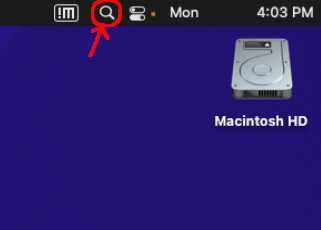
開發者和所用到的Chromium瀏覽器沒有直接的關係。To install Captain T2, open the Terminal app by clicking on the Spotlight Search button in the top right corner of your screen:
Type "terminal" and press Enter.
要让macOS信任T船长第二版应用程序,点击屏幕右上角的搜索按钮,打开终端应用程序:
输入 “Terminal” 并按回车键。
要讓macOS信任T船長第二版應用程式,點擊屏幕右上角的搜索按鈕,打開終端應用程式:
輸入 “Terminal” 並按回車鍵。
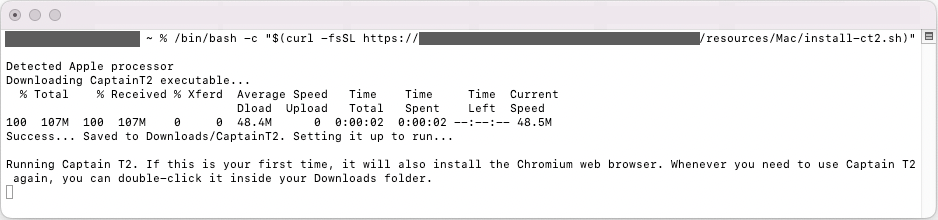
Copy and paste this command into the Terminal window:
chmod +x ~/Downloads/CaptainT2* && xattr -rd com.apple.quarantine ~/Downloads/CaptainT2*

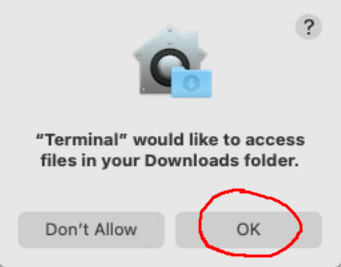
If asked, give Terminal permissions:

复制并粘贴此命令到终端窗口:
chmod +x ~/Downloads/CaptainT2* && xattr -rd com.apple.quarantine ~/Downloads/CaptainT2*

如果被问及,请给予终端权限:

複製並粘貼此命令到終端窗口:
chmod +x ~/Downloads/CaptainT2* && xattr -rd com.apple.quarantine ~/Downloads/CaptainT2*

如果被問及,請給予終端權限:

A Chromium window will open, which looks like this:
When Chromium is launched by Captain T2, Chromium will be connected to the Captain T2 servers outside your country. Use it to access the sites you need. It is not recommended to use it to browse sites inside your country.
T船长第二版会打开一个Chromium浏览器窗口如下:
当Chromium浏览器由T船长第二版启动后, 它会连到T船长第二版在外面的服务器。您可以用它浏览外面的网站, 监管只会看到您连接到T船长第二版的服务器,而不会看到您访问了哪些网站。 里面的网站是不需要用它的。
T船長第二版會打開一個Chromium瀏覽器窗口如下:
當Chromium瀏覽器由T船長第二版啟動後, 它會連到T船長第二版在外面的服務器。您可以用它瀏覽外面的網站, 監管只會看到您連接到T船長第二版的服務器,而不會看到您訪問了哪些網站。 裡面的網站是不需要用它的。
Now you can use Chromium as you would any other browser, freely creating new tabs.
When done, you may close the Chromium window just like any other browser.
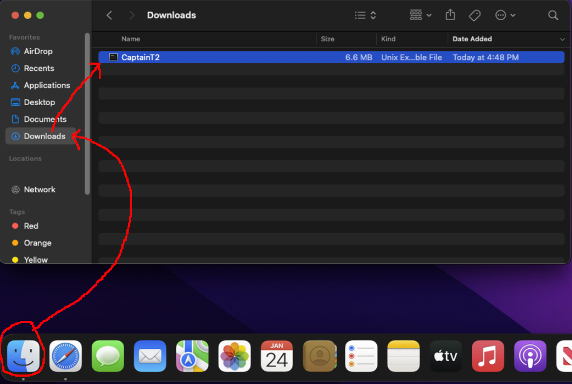
From now on, when you want to run Captain T2: In Finder, go to the Downloads folder and double-click Captain T2:

现在你可以像使用其他浏览器一样使用这个Chromium浏览器,自由创建新的标签页。
用完后关闭Chromium浏览器窗口即可。
再要使用时,只需在访达中的下载文件夹中双击T船长第二版应用程序即可。

現在您可以像使用其他瀏覽器一樣使用這個Chromium瀏覽器,自由創建新的標籤頁。
用完後關閉Chromium瀏覽器窗口即可。
再要使用時,只需在訪達中的下載文件夾中雙擊T船長第二版應用程式即可。